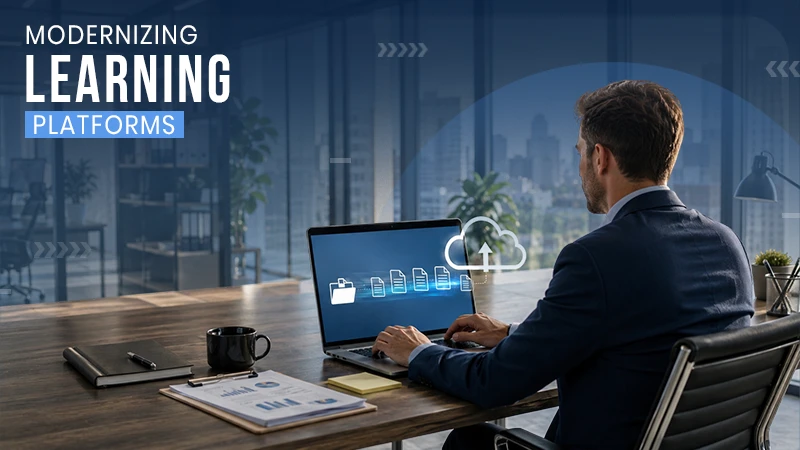
Do you know modern businesses rely on Learning Management Systems (LMS) to train employees, onboard them and transmit the company’s working style? For today’s hybrid, remote and global teams, it is essential.
But for every growing organization, there comes a point where the current LMS feels insufficient to meet rising needs. To overcome this, businesses use LMS migration and platform modernization.
When done right, it provides a more efficient, reliable and data-driven learning environment for both the employees and leaders.
This guide shares information about LMS migration and learning modernization along with a step-by-step process for a successful LMS migration.
Key Takeaways
- Mobile learning adoption has increased significantly with the remote and hybrid models.
- Modern LMS platforms are using AI to provide better recommendations and personalize experiences.
- Cloud-based LMS platforms have become a standard choice due to their flexibility and lower maintenance costs.
What Is LMS Migration and Why It Matters for Organizations
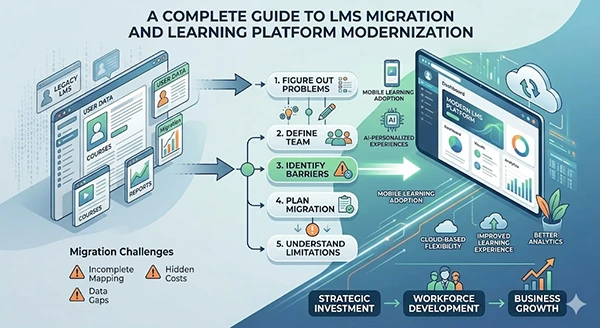
LMS migration is an effective process of multiple steps that involves transitioning from one LMS platform to a new one.
It involves the shifting or transferring of user data, contact details and learning content from one learning management platform to another. Above this, it demands minor but effective steps that change with the needs, creating corporate branding and more.
The reason businesses migrate from one LMS to another is the changing business requirements. When the graph of growth is on the rise, outdated systems need to be updated for smooth flow.
Other reasons involve poor user experience, limited data reporting and systems that demand expensive maintenance.
Key Challenges in Migrating a Learning Management System
While it is an improvement to switch to a better LMS, the migration process itself can create some hidden challenges. Let’s reveal those:
- Incomplete data mapping: Various LMS structure data in different ways; for this reason, some elements create mapping issues.
- The hidden costs: While the new LMS eases things, it still might result in extra help requests and add-on manual work.
- Data gaps: During the time the new LMS is getting prepared, the previous one needs to be operated the same way. People keep exploring things and generating new data.
In case it gets missed to collect those generated data and records, there might be data gaps that demand future fixes.
Step-by-Step Process for a Successful LMS Migration
Transitioning from a traditional LMS to a new one might be a bit of an overwhelming process, as many new things come into the picture. Here is a simple six-step process for a smooth LMS migration:
Step 1: Figure out your problematic spots
Before switching to some other LMS, one should figure out the reason behind this switch. When done, one will get a realistic implementation plan.
Step 2: Define an LMS migration team
Based on the company size, one might already have defined and set content and processes in function. Having a set team will take forward those processes and will manage how the information will be embedded.
Step 3: Identify common barriers
After defining the LMS you need and a team for that, check for the feasibility challenges to manage. The most common one is data migration challenges.
Step 4: Plan before making it happen
Data migration gets a bit complex when it is about switching over to another system. Ensuring aspects like no data gaps become critical. So, it is better to first plan for them.
Step 5: Understand limitations
There are various restrictions and limitations on content, such as webinar recordings. This is dependent on the vendor and their contract.
Next, it is up to the execution. The better things are ensured, and the planning is done, the better the LMS migration is.
Interesting Fact
A recent report by Deloitte Insights shared that modern employees look for learning that naturally adapts to their routine workflows. This shift indicates a demand for modern and upgraded LMS platforms.
How to Plan Data Migration and Ensure System Compatibility
Data migration is undoubtedly one of the critical parts of LMS modernization. Considering this, proper planning is required:
- Not all data needs to be shifted. Precisely select the data that needs to be migrated.
- Standardize the data formats, as not every LMS platform deals with the data the same way.
- Keep a straight eye on security and compliance because the complete migration process involves the movement of sensitive data.
These aspects are necessary for a smooth LMS migration and to be aligned with strict regulatory compliance.
A modern LMS platform is not just any other basic course delivery. Its advantages are many and reshape over time:
- Improved learning experience: Modern dashboards serve personalized content, mobile access and engaging interfaces to boost participation.
- Better analytics and reporting: Advanced reporting tools provide in-depth insights into performance and skills gaps. This helps to improve the lacking areas easily.
- Enhanced scalability: With the expanding businesses, LMS support larger teams with multilingual content and better strategies.
- Advanced remote and learning content: Modern platforms support digital classrooms, individual learning and collaborative learning environments.
Other benefits are served based on the needs and demands of growing operations and workforce. Also, discover the best HR software for remote and hybrid teams in 2026.
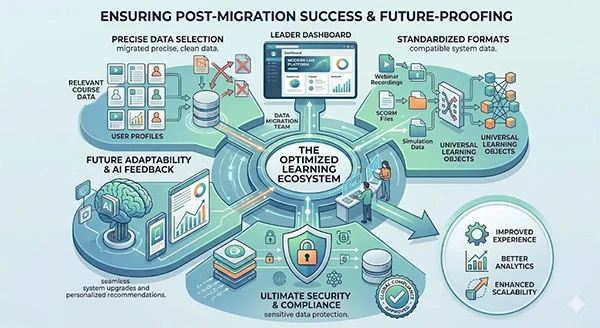
Modern organizations are investing in modern learning ecosystems that advance with change in technology, specific demands and real-time data. Above this, AI is continuing to play a major role in providing personalized content and specific training methods.
Such a flexible learning approach allows one to have skilled professionals who quickly evolve and adapt to modern technologies. And when employees get easy access to relevant knowledge, organizations get stronger and more adaptable teams.
Conclusion
LMS migration is not just about a technical upgrade, but a strategic investment in workforce development, operational efficiency and future business growth.
While the migration process can be a bit challenging, ensuring the right data transfer, user preference and careful planning, many of the risks can be effectively reduced. Once done right, they help to benefit from better engagement, in-depth insights and better efficiency.
This way, investing in a better LMS migration strategy can help to get smarter, personalized and more effective learning environments for many years to come.
FAQs
- How long does an LMS migration take?
The time taken will be more dependent on the organization’s scale; otherwise, a small one takes around a few weeks.
- What data is transferred to a new LMS?
In most cases, user profiles, course content histories and reports are shared or migrated.
- Is it possible to run old content in the new one?
Many of the times it can be possible, but older content may demand an update or reshaping.