The choice of using an operating system isn’t limited only to Windows, as many students and IT professionals are switching to Linux because of the immense opportunities it offers for the future.
It is an open-source platform that allows high customizability and includes better security than any other competitor, making it a great option to learn and build your tech skills from.
This article discusses why Linux skills matter, how to set up and navigate the new environment, and the career opportunities it offers after mastery.
Key Takeaways
- Linux acts as the backbone of an IT infrastructure, driven by cloud computing, server deployments, and more
- It opens up many doors for your career, thereby adding value to your resume and enhancing your skills
- Almost all the processes are performed through commands entered into the shell (CLI), making it essential for a beginner to learn about it
- All of the server administration responsibilities let you support modern application deployments across multiple systems
Why Linux Skills Matter for Students and IT Career Aspirants
Learning a new system or platform not only increases your knowledge but also opens up many doors for your career, thereby adding value to your resume and enhancing your skills. Linux offers just that by making you learn as you move through its interface.
Linux acts as the backbone of an IT infrastructure, driven by cloud computing, server deployments, and more. This quality has led to its widespread use in major organizations, increasing the chances of entry for professionals who have mastered Linux right from the start.
Getting Started with Linux: Understanding the Basics
This OS (operating system) works a bit differently from the others. Its core architecture consists of these fundamental parts:
- Kernel: This is the core of the platform, managing hardware resources, drives, memory, and all other CPU functions and processes
- Files: In Linux, your personal files can be accessed through directories (folders), it follows a tree-like structure that begins at the root directory
- Shell: It is a command-line interface that is operated using certain commands, allowing users to communicate with the OS directly
- Utilities: Basic built-in tools that help set up the fundamentals of the OS, enabling regular functioning
These are the main components of Linux that you should know, and learning about these enables you to understand its functioning and navigation.
Essential Linux Commands Every Beginner Should Learn
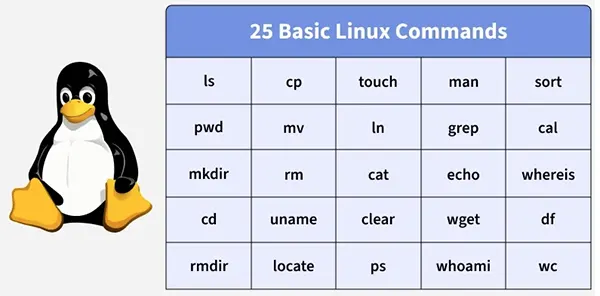
Almost all the processes are performed through commands entered into the shell (CLI), making it essential for a beginner to learn these to customize the Linux OS the way you prefer.
Here are a few basic commands a novice should know:
ls
The “ls” command lets you list files and directories present in the current directory.
Syntax: ls [options] [directory]
pwd
This command displays the full path of the folder you are currently working in.
Syntax: pwd
mkdir
This allows you to create new folders or directories in Linux.
Syntax: mkdir directory_name
cd
The command used to navigate between directories.
Syntax: cd directory_name
Fun Fact
The “cmatrix” command fills your screen with the iconic green falling digital rain from The Matrix, making you look like a Hollywood hacker.
cp
This enables you to copy specific files or even entire directories.
Syntax: cp source destination
rm
This function allows you to delete files from the existing database.
Syntax: rm file_name
cat
This command lets you see the file’s contents and even combine multiple files in one place.
Syntax: cat file_name
mv
The mv command in Linux allows the user to move files or rename directories.
Syntax: mv old_name new_name
These fundamental commands of the CLI enable you to perform regular functions in the OS, like copy, delete, rename, navigate, open files, and more.
Setting Up and Navigating a Linux Environment
Managing files and directories efficiently can be a lot trickier when you are unable to properly make your way to the folders or applications in a Linux environment.
The basic commands used in the shell assist you in setting up the OS according to your preferences and requirements.
But navigating a Linux interface is a whole different scenario, requiring you to master the basic concepts and commands, understand the full capabilities of the command-line interface, manage various directories of the system, and interact with the OS itself.
Advancing from Basic Linux to Server Administration Skills
Once the user has achieved mastery of the core functionalities of Linux, they can move on to the advanced features offered by the operating system.
One such advanced functionality is server administration. This enables you to create a dedicated server, connecting with other Linux systems, and providing you with the responsibilities of managing file and storage permissions, monitoring performance, securing other endpoints by applying network security, and creating automated backups.
All of these server administration responsibilities let you support modern application deployments across multiple systems simultaneously.
But remember, to create a dedicated server that establishes connections between your Linux devices requires you to select a reliable provider. Many users go with VPSserver.com as their starting point.
Career Paths and Opportunities After Mastering Linux
Mastering Linux not only expands your knowledge of Unix-based systems but also rewards you by opening up many career paths and opportunities.
It creates a foundational skill-set required for these industry roles:
- Devops engineering
- Linux systems administration
- Cloud architect engineer
- Cybersecurity engineer
These are very lucrative and high-demand career paths requiring mainly the mastery of Linux systems.
FAQs
Ans: The “cd” command allows you to easily navigate between various files and directories. The syntax of it is: cd directory_name.
Ans: The following are the industry roles:
- Devops engineering
- Linux systems administration
- Cloud architect engineer
- Cybersecurity engineer
Ans: It allows the user to connect with other systems, allowing them to manage storage and file permissions of many computers at once, and enables the monitoring of performance.
Ans: The following are fundamental components:
- Kernel
- Files
- Shell
- Utilities