Many different LMS platforms have a lot of features; some promise user-friendly dashboards, and some platforms perform better at compliance-tracking, while some excel at ease-of-use features.
Moreover, it basically depends on where the organization’s priorities stand; some may lean towards simplicity and affordability, while large enterprises may prefer multi-system integration and regulatory controls.
In this guide, we’ll understand these priorities and evaluate LMS platforms through the right lens, while also looking at the features that help businesses grow.
Key Takeaways
- Why comparing features of LMS softwares matter for an organization
- Core functionality of these systems
- Discussing features provided by LMS softwares
- Which LMS system is best for you according to your requirements
Why Feature Comparison Matters?
Comparing LMS features is a critical task when it comes to corporate training and development. In case you select an LMS without comparing its features and different platforms, you might be wasting your resources and time.
For instance, an LMS built for corporate training might not have classroom features that are required for an educational institution. In the same way, an LMS that is for compliance training might lack social learning features, often required for collaborative learning.
When you choose a mismatched LMS, it can frustrate the users and even impact the engagement and effectiveness of the training programs. This is why it is important to compare different LMS features.
Some of the must-compare features include:
Core Functionality
Course creation and management are the foundation on which everything relies. If an administrator can’t build structured learning paths, assign courses, and track learners’ progress, no amount of engagement features will save the platform.
Firstly, we start by evaluating content format support. The platform that is capable of handling videos, PDFs, and giving interactive lessons gives you the flexibility to manage your training library.
Also, SCORM compatibility is a really important feature that lets organizations migrate and reuse all material instead of rebuilding everything.
Assessment tools like quizzes, assignments, and surveys separate the learning platform from a document repository. These help create checkpoints that show whether learning is happening or not.
For a regulated industry, automated certification tracking and training reminders are not optional features. These are operational requirements that will reduce compliance risk.
When comparing platforms on core functionality, keep in mind that it’s not about whether a feature is being offered; it is about how much manual work is still required.
User Experience
A feature-rich LMS can still fail if users find it difficult to navigate. Having a poor UX is not just a technology problem – it leads to low completion rates, workarounds, and a platform nobody logs into. Simply put, ease-of-use is not a soft requirement; it directly impacts whether your training investment produces results.
Additionally, mobile learning is no longer optional. Hybrid or even remote employees are not always at their desks, and the software might not work on their mobile devices. So, it is essential to have mobile learning. It is better to test the mobile experience and assess course navigation, progress tracking, and assessments.
Moreover, personalization is where modern LMS platforms differentiate themselves. A new hire and a senior employee will have different training needs. So, you need to look for a platform that supports role-based learning paths. This matters when you are training a diverse workforce.
Integration And Interoperability
A good LMS system should be able to integrate with existing HR, payroll, and other performance management systems of the company smoothly. If that process isn’t perfect, then all the systems end up with fragmented data and duplicate entries spread across multiple platforms.
Syncing with HR systems verifies employee data and cuts the manual update process, while integration with CRM platforms adjusts training according to the individual performances of employees.
Reporting And Analytics
Reporting tools help organizations make informed decisions. With the help of analytics, managers can uncover trends, identify skill gaps, and justify budgets for training. This is why it is important to compare the reporting and analytics capabilities of different platforms when making your pick.
For instance, tracking onboarding completion can highlight departments that need additional support. Compliance monitoring helps verify deadlines are met, lowering legal risks. In fact, actionable insights can reshape learning from a regulatory obligation into a catalyst for achieving goals.
Collaboration And Engagement Tools
The base of a strong organization is built on how employees collaborate and engage. In terms of LMS selection, collaboration and engagement tools can help with adoption and encourage learning among peers.
Features such as discussion forums, social learning, chat, and gamification (points, leaderboards, badges) encourage interaction and knowledge sharing. Research shows that around 80% of learners engage more with gamified learning tools, illustrating the impact of gamification on participation.
However, engagement tools should match the company’s culture. For example, gamification can be effective for sales teams but may offer limited value in highly regulated environments.
Compliance And Security
Compliance with regulations and data security is not negotiable, particularly for organizations in regulated industries. Therefore, it is important to factor in compliance and security features when selecting an LMS.
For example, an LMS should offer role-based access, as it makes sure users only see the relevant content. Similarly, computerized certification management and audit-ready reporting simplify compliance, specifically in healthcare, finance, and government sectors.
Depending on your region and organization’s nature, compliance with GDPR or HIPAA is also important, and the selected LMS should adhere to that.
Fun Fact
Before computers were invented, Sidney Pressey in 1924 invented a “teaching machine” that used to administer questions, acting as a predecessor of modern LMS systems.
How Do You Compare LMS Features?
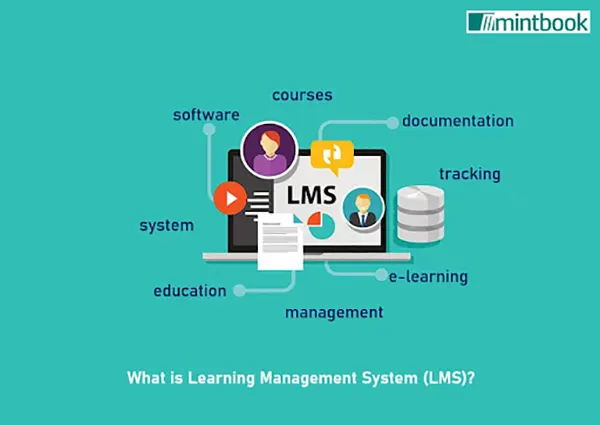
When it comes to choosing the LMS that fits the needs of your organization, you must systematically compare the features. Since not all the platforms are created equal, here are steps that will help you do just that:
Define Your Requirements
You should start by evaluating your organization’s needs or objectives. What are the problems you are trying to solve? Is it compliance training, partner enablement, onboarding, or skills development? Are you looking for interactive or text-based learning materials or immersive video content?
After this, you should make a list of must-have and nice-to-have features. Must-have features are non-negotiable; if a platform doesn’t offer these, you can remove it from the list. You can prioritize capabilities like assessment and quiz, reports and analytics, blended learning, SCORM compliance, and an intuitive user interface.
Moreover, you should consider having an LMS that offers mobile access, so your employees can learn on-the-go. Besides this, integration with other tools like Human Resources (HR) systems is also important.
List Down Vendors
The next step is to look for LMS vendors. Don’t settle with the leading names; look beyond them. You must go through industry reports, ask your peers what they use or avoid, and read user reviews with a focus on use cases similar to yours. This will help you list platforms that match your needs.
Make A Comparison Chart
Now that you have the features you want and a list of vendors, you can make a side-by-side comparison chart. Assign a weight to each requirement based on how crucial it is to your company. Then, score each platform against it. This will help evaluate how each platform measures up against your criteria and will help you make trade-off decisions.
Request Demos
By this point, you would have the list down to 2 or 3 platforms. A crucial step is to get hands-on experience with the software. This will help you assess its usability, alignment with your needs, and feature set. It is better to have questions or scenarios ready for the demo. Keep in mind that these questions should be related to the learning and development challenges of your organization.
Finalize Platforms Based On Your Experience
With the gathered insights from the comparison and demos, you must evaluate each LMS. There are certain factors you need to focus on, such as current offerings of the platform, how helpful customer support is, and vendor history updates. For the final decision, you can involve stakeholders across the company for their insights and choose based on the pros and cons of each option.
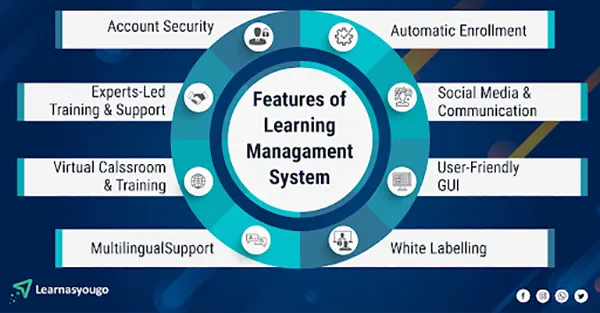
Check out this infographic to understand the features of an LMS platform:
Conclusion
Hence, if every LMS platform and its features don’t fit with your organization, it is crucial to prioritize features and choose a platform that best matches the company’s requirements and workflow.
A smart comparison transforms a complex decision into a trusted and reliable investment, maximising performance and achieving quantifiable results for the business.
Ans: A learning management software (LMS) is used to manage, create, and track training documents, videos, PDFs, etc. It is also responsible for automating certain administrative tasks and tracking employee performance.
Ans: There is a need to compare features of LMS platforms, as every organization has different needs and priorities. Some companies may prefer a specific LMS platform that may not be perfect for others.
Ans: LMS platforms have role-based access features to enhance the security of the company’s systems and to ensure that compliance audit-ready reports are updated and kept in the software.
Ans: Shareable content object reference model (SCORM) is a set of technical standards that allow learning courses to fully communicate with LMS systems to ensure smooth integration of data.