AI tools provide quality content, and that too in less time. Bet yet, most of the individuals avoid using it to maintain a standard. Which says that – No AI text. But this will no longer be the concern of not taking advantage of the AI tools.
You might think – but how? By using a trick that even the smartest AI detector can detect – that is, to make it sound like you. This works great, as the industry experts have found that AI content lacks a personal touch. When added, it turns to human written piece.
Learn how to rewrite AI-generated text to avoid detection, while maintaining the tone and not losing its quality.
Key takeaways
- When used effectively, AI text can be converted to human-written text that is not detected by any tool.
- Adding a personal touch is the best way to humanise content while taking advantage of quality content from AI.
- To save time, one can rewrite some content while humanizing the rest of the content through humanizing tools.
What AI Detection Actually Looks For
AI detectors don’t know who wrote the text. Instead, they analyze patterns.
Most detection tools scan for clues that are common in AI-generated text. These signals come from how an AI text generator sets up sentences — by guessing the most likely next word. The tone is too similar, without natural dips in quality or sudden precision.
The main things detectors tend to pick up:
- Uniform sentence length with little variation
- Overused phrases (“furthermore,” “significant,” “in conclusion”, “delve into” etc)
- Absence of a distinct voice or point of view
- Generic explanations with no specificity
- Overly formal or “educational” tone throughout
You can see some of these patterns in the example here:
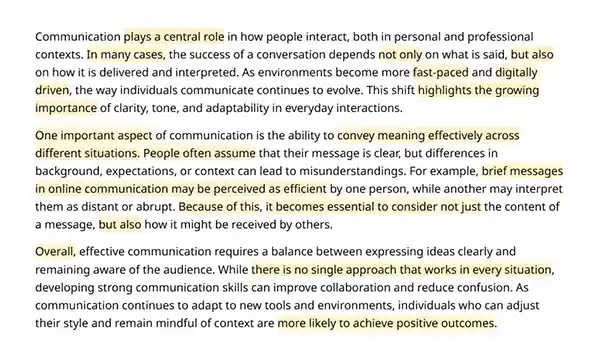
The text is clean, but also typical, with repeated phrases and a lack of specific detail.
Keep in mind that AI detection is not always exact. Tools estimate probability, and mistakes happen in both directions. A fully human-written essay can be flagged, while heavily edited AI text can pass without issues.
The goal isn’t to trick a score, but to produce writing that a real person would actually write. The detection score tends to follow from that naturally.
How to Rewrite AI-Generated Text Effectively
There’s no single right way. The process will hinge on how much you want to keep from the original and how much time you have.
The steps below can be used in order or selectively, depending on the draft you’re working with. Still, if you follow this exact workflow, you greatly reduce the chances of your text being flagged.
1. Identify What’s Worth Keeping — Then Regenerate the Rest
Not every paragraph deserves the same effort. Some sections are vague enough that editing them takes longer than starting over. Before you go back to rewriting, scan the draft and mark the parts that feel genuinely useful versus the ones that just fill space.
For sections you plan to redo, it’s often more effective to use AI writer tools tailored to generate a text with more natural, human-like words from the start, rather than based on general-purpose models like ChatGPT or Gemini. The cleaner your input, the less correction you’ll need further on.
2. Add Your Own Input
This is the most basic step, and it’s the one people miss most often. AI-generated text is unoriginal because it has no author. It doesn’t have an idea, a memory, or a specific experience to learn from. But you do.
Before you touch the structure or run any tool, read the draft and ask: where can I add something real? That might be a personal take, a specific example from your own work, a stat you actually looked up, or just an honest reaction to something the AI stated too cleanly. Even a sentence or two of that per section changes the character of the writing significantly.
| Raw AI Text | Human Edit |
| Regular exercise has many health benefits. | I started running three times a week and my focus at work noticeably improved. |
3. Paraphrase or Humanize Your Text with a Dedicated Tool
Tools can handle a lot of the structural work and save you significant editing time in the process. There are two types worth knowing, and they serve a bit different purposes.
An AI humanizer reworks the draft at a higher level. It changes rhythm, varies sentence structure, softens formal phrasing, and shifts tone toward something more natural. Use it on robotic drafts that need more than surface-level edits.
A paraphraser lets you paraphrase a sentence or a paragraph without strictly restructuring the whole text. You can use it when the draft is already reader-friendly but certain phrases feel repetitive or too common.
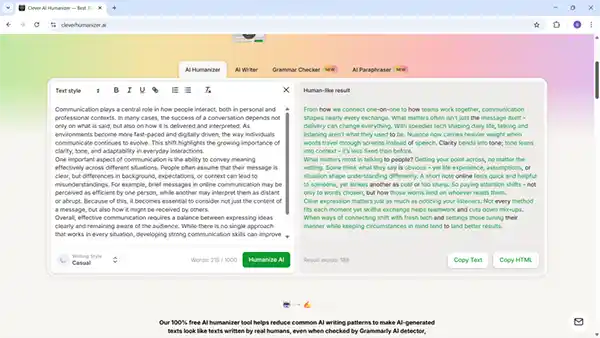
The whole process of fixing text with these tools usually takes less than a minute. For example, we’ll show how it works in Clever AI Humanizer, which is one of the very few completely free AI humanizer options available. And the paraphrasing tool is available there as well.
To humanize AI-generated text:
- Paste your draft
- Select a writing style that suits you the best
- Click the “Humanize AI” button and review your result
The paraphrasing workflow is almost identical. You still paste your text, choose a style, and review the result. The main difference is that it offers more style options, which makes it useful for fine-tuning wording.
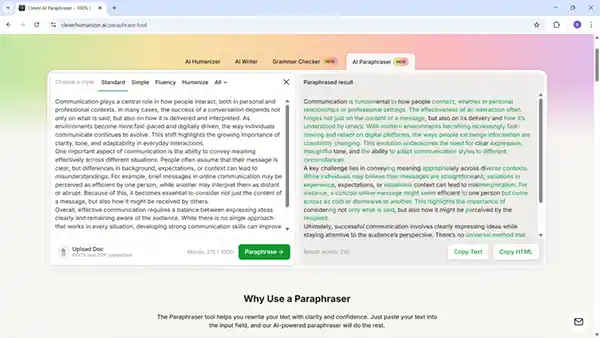
Compare the results yourself:
| Original AI Text | Paraphrased | Humanized |
| One important aspect of communication is the ability to convey meaning effectively across different situations. | A key challenge lies in conveying meaning appropriately across diverse contexts. | What matters most in talking to people? Getting your point across, no matter the setting. |
Pro tip: run the humanizer first on parts that feel artificial, then apply the paraphraser slowly on phrases that still feel stiff. But don’t run both on the same text without reviewing in between, because repetitive processing often produces difficult phrasing.
A good tool is often enough to reduce AI-detection risk on its own. But if you prefer not to rely on extra tools, or you want more precise control over the text, the following tips will help.
4. Break AI Structure
Even after running a humanizer, some structural habits from the original AI text can persist. Look for these specifically and fix them by hand.
- Change sentence order. Move the specific detail to the front sometimes. Start with the example, then explain it.
- Vary sentence length. Split long compound sentences into two shorter ones or combine two short ones where appropriate.
- Remove predictable transitions like “furthermore”, “it is worth noting”, “ultimately” and so on. Replace them with something plainer, or remove them entirely and let the logic carry the paragraph.
5. Replace Generic Language
Generic language is one of the clearest signs of AI output. Though, that’s easy to fix once you notice it.
Look for phrases like “it is important to”, “in today’s world”, “plays a significant role”, “ever-evolving” etc. Reword any phrase that could apply to almost any topic and use direct language instead.
Specificity is what makes the text feel like real effort went into it.
| Vague | Specific |
| This is important for users | This helps users save time when working with large files |
6. Proofread and Final Check
At this stage, the text should already read naturally. The goal now is to catch small issues and make sure everything feels consistent and intentional.
- Fix grammar, punctuation, and awkward phrasing
- Check for repeated words or sentence patterns
- Remove anything that still sounds generic
- Make sure the tone stays consistent throughout
- Read the text out loud to catch unnatural flow
A figure can tell you whether the changes stick. Try feeding the draft into a checker – this often shows how well the structure holds up. When numbers drop, chances are good the reworking helped. High marks? That hints at where parts drag or echo too much.
AI Bypass Tricks: What People Try
Some people get creative looking for shortcuts. A few of these methods may sound clever at first glance. But in practice, they don’t solve the real problem.
Invisible typos or intentional errors
Some people suggest inserting invisible symbols or making small mistakes to confuse detectors. The issue is that it doesn’t change the structure of the text.
It can also break formatting, and if detected, may be seen as an attempt to deceive, which can lead to more serious consequences than a high AI score.
Replacing words with synonyms
This is one of the most common approaches. You take the original AI text and swap words for alternatives. It looks different on the surface, but since detectors focus mainly on patterns, not just vocabulary, the text still reads as artificial.
Translating text to another language and back
A different idea is to run the text through a translator, for example, English > Chinese > English, like this Reddit poster offered.
Yes, it introduces variability but also errors and lost nuance. The result often reads like something went wrong in translation — because it did.
Over-randomizing text.
This means pushing AI tools to offer less robust output by using best prompts or higher variance settings.
While this can reduce overuse, it often raises new problems: sentences become unclear, tone becomes uneven, and meaning can change. You end up handling those issues the next day anyway.
All of these methods focus on surface-level changes. They try to hide patterns instead of removing them.
Final Thoughts
AI is undoubtedly a useful tool that provides unparalleled content. What allows you to make effective use of it is how you consider its end result and refine it by adding a personal touch to it.
Some effective strategies, such as focusing on the structure rather than words, removing parts that actually sound like machine-generated and adding that experienced touch to your writing, help a lot.
In the end, the more it shares about the experiences and real-life decisions, the more it will feel like human-written.
FAQ
Rewriting changes both structure and wording. Paraphrasing mainly alters words but keeps the same structure. Humanizing changes the tone, rhythm, and flow so the text sounds more natural.
It might be suitable for many, also time taking for others. For the ones who want to save time, it is best to write some content by themselves, and the rest use AI tools to sound like a human.
Not with any guarantee. Detection is probabilistic, and no method produces a certain result. The more useful target is writing that a human reader simply doesn’t notice as unusual.
When the situations demand for original thought, academic posts, legal documents, medical content, or anything created under your name, accuracy and honesty matter. In those cases, use AI for research and structure, but write the final piece yourself.