“Cybersecurity is a shared responsibility, and it boils down to this: in cybersecurity, the more systems we secure, the more secure we all are.” – Jeh Johnson (American lawyer)
Your laptop is a digital backpack that contains your identity, academic legacy, and your finances. In 2026, the line between school and the web had almost vanished, which left students exposed to sophisticated hackers. Securing your digital perimeter is no longer just for tech experts; it is an essential survival skill for every modern learner who is protecting their future.
Why Network Security Matters for Students Using LMS
Logging into an LMS connects you to a massive data hub. These platforms are like goldmines for the cybercriminals as there they get tuition details and personal IDs. A compromised connection risks more than grades; it allows hackers to hijack your entire student identity. You can secure this link to make sure that your academic process remains entirely yours.
Understanding the Basics of Network Security for Online Learning
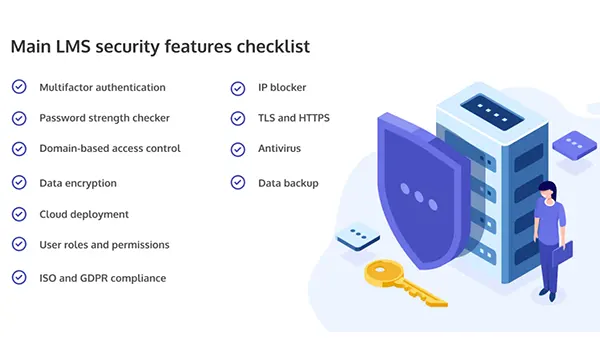
A network is not just a single wall that you build; it is a series of layers that are designed to frustrate and block the intruders. To stay safe, you need to learn why multiple types of network security are essential, as relying on just a single defense, such as a password, is no longer enough in this age of AI-driven attacks.
- You should use a combination of hardware and software tools.
- Have a proactive mindset and assume that threats are present and you need to verify every connection.
- Make sure that the files you upload and download have not been tampered with.
Did You Know?
45% of the cyberattacks are mostly targeted at small businesses and individual students because they have the weakest security.
Navigating the web means identifying which element holds the most danger for the average learner.
Common Cyber Threats Faced by Students
Phishing can be considered the king of student threats. You may receive an email that looks just like a ‘Password Reset’ from your university or an email regarding ‘Financial Aid Update’. These are often traps that are designed meticulously to steal your credentials.
In addition to this, ransomware can also lock your semester’s work behind an encrypted wall, demanding payment to get your files back.
How Learning Platforms and Wi-Fi Networks Are Targeted
Hackers often exploit ‘Man-in-the-Middle’ attacks on the campus networks. By decoding the data traveling between your device and the router of the school, they can sniff out your login tokens. Because thousands access the LMS, one weak link (which can be you) can sometimes offer a gateway to a larger institutional breach.
Using Strong Passwords and Multi-Factor Authentication
If your password is your pet’s name, it means you are literally leaving your front door wide open. Use a passphrase, which can be a string of random words, and a password manager. More importantly, you can enable Multi-Factor Authentication (MFA), because MFA ensures that even if a hacker makes a right guess regarding your password, you cannot get in without that secondary code sent to your phone.
Securing Personal Devices Used for Learning
Your hardware is your major interface with the digital world, making it the first line of physical defense.
Keeping Operating Systems and Apps Updated
Although the ‘Update Now’ notifications are annoying, they are critical. Software updates generally contain ‘patches’ for security holes that hackers have recently discovered. Ignoring the updates is like leaving a broken window in your house unrepaired.
Using Antivirus and Firewall Protection
A solid firewall is like a gatekeeper that monitors incoming and outgoing traffic. Pair this with a reputable antivirus that uses real-time scanning. In 2026, ensure that your antivirus software uses encryption protocols to protect your data from prying eyes while it’s in transit across the web.
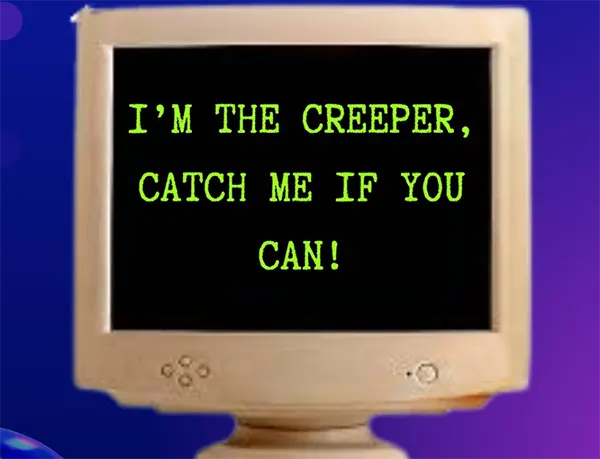
Fun Fact: ‘Creeper’, the first computer virus, was created in 1971. It displayed a message saying, “I’m the creeper, catch me if you can!”
Safe Practices When Using Public and Campus Wi-Fi
Coffee shop Wi-Fi is a playground for hackers. If you cannot avoid studying in public, you should always use a Virtual Private Network (VPN). A VPN creates a private tunnel for your data, ensuring
Conclusion
Network security is not about being paranoid; it is about being prepared. Implementing MFA will help you keep software fresh and stay skeptical of public Wi-Fi; you can transform yourself from a soft target into a digital fortress. Your education is an investment, and you should not let a single security lapse take it away from you.
FAQs
It will only hide your local history; it doesn’t mask your activity from admins or hackers.
No, not specifically. Since many people use it, it is a high-traffic target for hackers, so you must treat it as a public network.
Yes, to protect against phishing attacks and malware in 2026.